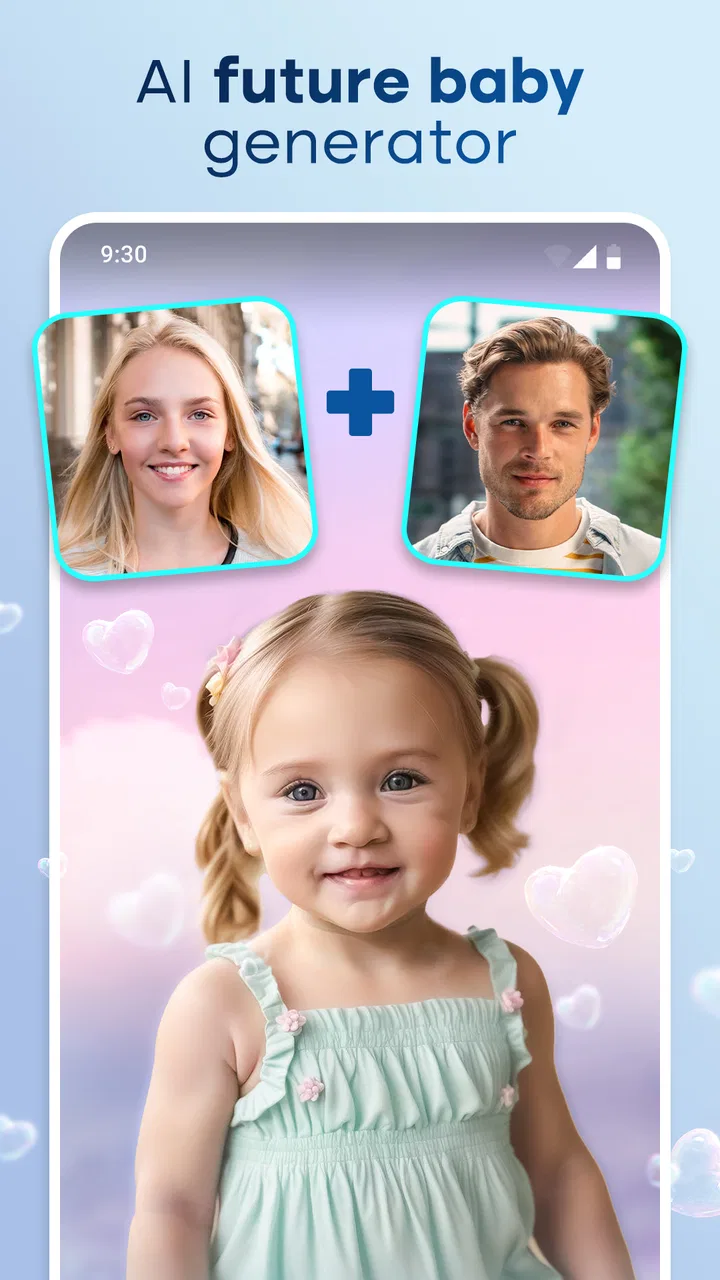
Future Baby Generator - GenArt
- 4.5
- Rating
- 1.00M
- Installs
- Free
- Price

 Analysis by App-foxy
I tried Future Baby Generator - GenArt as a lighthearted photography app rather than as a serious prediction tool, and that distinction matters from the first tap. Its purpose is to create an AI-style image of a possible future baby face, making it more of a playful visual experiment than a dependable family-planning service. I can easily imagine opening it with a partner, a friend, or relatives and comparing the results for a few laughs.
The app is free to install, aimed at Everyone, and comes from Lyrebird Studio Teknoloji Limited Şirketi. It sits in the photography category, but its appeal is closer to a social novelty tool than to a full photo editor. You are not downloading it for manual retouching, camera controls, or professional image organization. You are downloading it for a quick transformation built around imagination and sharing.
After using it, my overall impression is positive but deliberately limited: it is enjoyable when expectations stay casual. The generated face should be treated as an entertaining AI interpretation, not a biological forecast. That simple mindset makes the experience much more satisfying and also helps explain where this app is stronger than ordinary photo-editing alternatives.
You May Also Like

 Blood Strike: 2.5 Anniversary
Blood Strike’s Loadouts Turn Every Drop Into a Tactical Gamble
A close look at Blood Strike’s custom loadouts: how fast access to signature weapons reshapes its battle royale rhythm, rewards preparation, and narrows the gap between fights.

 Pandora - Music & Podcasts
Pandora’s Music Is Easy to Start, but Harder to Recover
Pandora’s strength is its low-effort path from a seed to a station. Its weak spot is how much confidence it asks you to place in connection, setup, and quiet recovery.

 8 Ball Pool
 Is Built on Rivalries, Rematches, and Routine
A close look at the rivalries, rematches, shared routines, and unanswered safety questions that turn a quick pool match into a persistent mobile community.

 Samsung Music
’s Quiet Strength Is Playing What You Already Own
Its reach comes less from spectacle than from dependable access to a personal library. That simplicity is both the app’s strongest retention engine and its ceiling.

 AccuWeather: Weather Radar
AccuWeather Review: A Quick, Clear Forecast for Everyday Decisions
For everyday plans, the best forecast is the one you can understand quickly. AccuWeather makes rain timing, radar, and local conditions easy to act on, with a few trade-offs.

 Hill Climb Racing
Why Hill Climb Racing Still Turns Crashes Into One More Run
A tiny car, a bumpy hill and one more upgrade: Hill Climb Racing keeps resurfacing because its simple chaos makes every near-miss feel personal.
More From Our News Desk
View All News


How the experience feels from the first image to the final result
I find the experience most enjoyable when I treat the first image as the beginning of a small experiment, not a verdict on what a future child might look like. In this section, I’ll focus on how to make the result easier to assess and share without getting lost in repeated attempts. A little intention around the photos can make the final image feel more personal, which leads naturally to choosing what to do with it next.
Speed expectations and the first-use flow
The main appeal is immediacy. Instead of learning a complicated editing timeline, I can approach the app with one small creative goal: see what a future baby might look like. That focused purpose gives it a shorter learning curve than a conventional editor. Someone who rarely uses photography software should understand the idea quickly because the result, rather than the editing process, is the center of attention.
In everyday use, I would prepare the source photos before starting. Clear, front-facing images with visible facial details are a sensible choice for any face-based AI experiment, and they also make comparisons easier. If I were testing it at home with a partner, I would choose one recent portrait from each of us, keep the lighting reasonably similar, and save the generated result alongside the originals. That small bit of preparation makes the outcome feel more like a fun experiment and less like a random filter.
The app’s current version is 1.1.18, and its broad audience is reflected in the Everyone content rating. That combination makes it approachable for casual family use, although parents should still explain to children that the image is imaginative. A generated face can look convincing without having any predictive value, so the best way to introduce it to younger users is as a creative picture-making activity.
The most useful speed tip is to decide what you want to compare before generating anything. If you simply tap through multiple combinations without a reason, the novelty can wear off quickly. A better workflow is to test one pair of photos, look closely at the result, then change only one source image or one presentation choice at a time. This gives the activity a little structure and helps you notice how much the input pictures influence the final impression.
What happens during heavier use
The app is most likely to feel demanding when it is being used repeatedly rather than once. Creating several versions for different photos, people, or occasions naturally creates a heavier session than making one image and leaving. I would use it in short bursts: generate a result, inspect it, save or share it if it is worth keeping, and then move on. That approach is more comfortable than treating it like a continuous editing workstation.
A realistic scenario would be a family gathering where several relatives want to try the idea. The first result may be fun, but a long queue of similar attempts can make the experience less special. I would set a simple rule: one or two carefully selected photo pairs per person. This keeps the activity social and reduces the chance that everyone ends up staring at a phone while waiting for another variation.
Another practical consideration is storage. AI-generated images are still images, and repeated experiments can gradually clutter a gallery. I recommend deciding in advance which results deserve to be kept. If the app produces several versions that look similar, saving every one may make later organization harder. A small album for generated family images is more useful than leaving them mixed with screenshots and ordinary camera photos.
For users who want to create a large batch of polished portraits, this is not the tool I would choose first. A dedicated photo editor or a broader AI imaging service may offer more control over output, composition, and revision. The strength here is the narrow, playful concept. Once the session becomes a production task, that narrowness becomes a limitation rather than a benefit.
Reliability, recovery, and the role of the source photo
Reliability in an app like this is not only about whether it opens. It is also about whether the result feels coherent enough to be enjoyable. Face-based generation can be sensitive to the quality and angle of the input, so I would not judge the app from a single poor source image. A dim portrait, an obstructed face, or two pictures with very different framing can make the output less convincing even when the app itself is working as intended.
My preferred recovery method after an unsatisfying result is simple: go back to the source material before blaming the generator. Choose cleaner portraits, avoid heavy sunglasses or dramatic side angles, and try again with a more consistent pair. This is a non-obvious but important trade-off. The app feels more dependable when the user treats photo selection as part of the creative process instead of expecting every input to produce an equally appealing image.
If a session does not go as planned, I would also avoid repeatedly pressing the same action without checking what has already been created. Repeating taps can lead to confusion about which image is the newest, especially during a group session. A calmer recovery routine—wait for the current attempt to finish, review the gallery or output area, then begin the next attempt—makes the experience easier to manage.
The app’s popularity gives it a reassuring level of visibility: it has passed one million installs and holds a 4.5 average from around 7.9 thousand ratings, with roughly 590 written reviews. Those figures suggest that the concept has found an audience, but they do not turn the generated images into evidence. I see them as signs that people enjoy the novelty, not as proof that the results are accurate.
Device constraints and practical expectations
The minimum operating-system requirement is Android 7.0, so the app is not restricted to only the newest Android phones. Even so, compatibility and comfort are different things. Older devices may be perfectly able to install it while offering a less pleasant experience during image processing or repeated use. I would keep expectations moderate on aging hardware, especially if the phone is already short on free space or running many other apps.
Because the app works with personal photos, I would also think about the device itself before beginning. A phone with a clear gallery, enough room for new images, and a stable everyday setup is more convenient than a nearly full device. This is not a reason to avoid the app; it is simply the kind of preparation that prevents a playful experiment from turning into a storage or organization nuisance.
For iPhone users, the practical question is whether the version available on their device offers the same experience, since the confirmed minimum-system detail applies to Android. I would check the relevant platform listing before planning a group activity. That is especially sensible if several people are bringing different phones and expect identical controls or output behavior.
The free entry point is useful for trying the basic idea without committing immediately. However, in-app purchases range from $3.49 to $39.99 per item, so I would pay attention to any purchase screen and avoid assuming that every possible option is included at no cost. If I were handing the phone to a child, I would supervise that part directly. The Everyone rating describes the intended audience, but it does not remove the need for ordinary purchase awareness.
Where it beats ordinary photography apps—and where it does not
Compared with a standard camera app, this tool offers a completely different reason to open it. A camera app records what is in front of you; this one turns familiar faces into a speculative image. Compared with a normal filter editor, it is less about color, makeup, lighting, or surface effects and more about a themed transformation. That makes it a better choice for a conversation starter than for improving an actual portrait.
It is also simpler than a full AI art platform. A broad generator may let users describe scenes, change styles, or revise many visual details, while this app keeps the idea centered on a future-baby face. I prefer that focus when I want a quick, understandable result. I would choose the broader platform instead when I need a specific background, a controlled artistic style, or several rounds of detailed editing.
One useful workflow is to treat the generated image as a starting point for a small personal project. For example, I could make one result for a private family chat, place it beside the two source portraits in a simple collage, and add the date or occasion manually in another editor. This separates the app’s imaginative generation from the presentation work. It is a better approach than expecting one specialized tool to handle creation, design, captions, and archiving equally well.
I would not use the app to make claims about resemblance, genetics, health, or a child’s actual appearance. Even if a face looks plausible, the image is still an AI-created interpretation. That is the central ethical and practical boundary. Used as a joke, keepsake, or conversation piece, it is harmless fun; used to make serious predictions, it becomes misleading.
Who will enjoy it most
This app is a good match for couples curious about a playful visual “what if,” friends looking for a quick group activity, and families who enjoy experimenting with photo effects. It also suits people who prefer a focused tool over a large editor full of menus. The short concept is its advantage: you do not need to become a photography enthusiast to understand why you might use it.
It is less suitable for photographers who want manual control, professionals who need consistent client-ready portraits, or anyone searching for a dependable face-analysis tool. It is also not the right choice for users who dislike speculative AI imagery or want results that can be explained scientifically. In those cases, a conventional portrait editor—or simply a regular camera—would be more honest and more useful.
Privacy-minded users should make their own comfort decision before selecting personal images. A future-baby concept naturally encourages people to use intimate family photos, so I would avoid uploading pictures that I would not normally share with a playful image service. I would also ask permission before using someone else’s face, particularly if the result will be posted publicly rather than kept in a private conversation.
My performance verdict after weighing the trade-offs
My final view is that Future Baby Generator - GenArt succeeds when it stays small, social, and entertaining. It does not need to replace a photo editor because it offers a different experience: a quick imaginative result that gives people something to discuss. The developer, Lyrebird Studio Teknoloji Limited Şirketi, has positioned it in a way that is easy to understand, and the free installation makes trying the idea straightforward.
I would approach it with a few good source photos, use it in short sessions, keep an eye on storage, and treat every result as creative fiction. Those habits address the main friction points without taking away the fun. I would also review purchase prompts carefully, since optional items can cost from $3.49 up to $39.99 each, which is a meaningful difference from the free starting point.
My recommendation is simple: try it if you want a playful baby-face generator, not if you need accuracy or professional editing control. For a relaxed evening with a partner or a few laughs at a family gathering, it has a clear purpose and enough charm to justify a place among casual photography apps. Just keep the expectations grounded, choose the input photos thoughtfully, and remember that the most valuable part is the conversation around the image—not the idea that it predicts the future.
FAQs for Future Baby Generator - GenArt
01What is Future Baby Generator - GenArt and how does it work?
Future Baby Generator - GenArt is an app that allows users to see what their future baby might look like by analyzing photos of the parents. The app uses advanced facial recognition technology and algorithms to merge features from both parents’ photos and generate a realistic image of a potential child.
02Is Future Baby Generator - GenArt accurate in its predictions?
While the app uses sophisticated algorithms to create images, it should be noted that the results are for entertainment purposes only. The generated images are hypothetical and based on current photos, without considering other genetic factors that might influence a child's appearance.
03Are the photos uploaded to Future Baby Generator - GenArt secure?
Yes, the app takes user privacy seriously. Photos uploaded are used solely for the purpose of generating the baby image and are not stored or shared with third parties. Users should still review the app’s privacy policy to understand how their data is handled.
04Can Future Baby Generator - GenArt be used offline?
No, Future Baby Generator - GenArt requires an internet connection to function properly. The app needs to access its servers to process images and generate results, so users must have a stable internet connection to use the app effectively.
05Is Future Baby Generator - GenArt free to use?
The app offers both free and premium features. Users can access basic functionalities for free, but there may be in-app purchases or subscription options to unlock additional features, such as high-resolution images or more customization options. Check the app's store page for detailed pricing information.
Pros
- Easy-to-use interface for all ages.
- Generates realistic baby images quickly.
- Allows customization of parent photos.
- Shares results easily on social media.
- Fun for family and friends to use.
Cons
- Limited free features; in-app purchases required.
- Occasional ads disrupt user experience.
- Results may vary in accuracy.
- Requires good quality parent photos.
- Privacy concerns with photo uploads.

Future Baby Generator - GenArt
Gallery